Wave Shaper
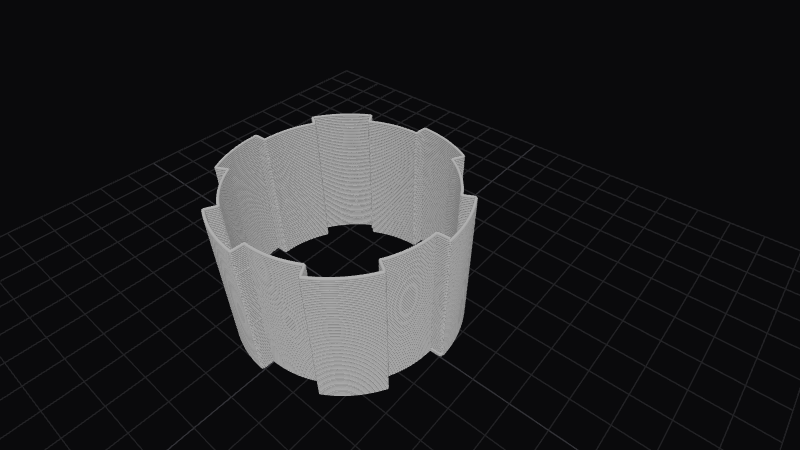
Wave Shaper drives displacement with band-limited square, saw, and triangle waves instead of a pure sine. You get flat tops, sharp direction changes, and asymmetric ramps that read as architectural or mechanical. Duty and spiral give you extra handles for pulse width and helical skew without leaving the periodic family.
Preview
Effect Controls
Interactive preview is available in the interactive reader.
Parameters
Frequency- Number of wave cycles around the perimeter (0.1–30). Higher values tile the chosen waveform more often along the loop.
Amplitude- Peak displacement depth in millimeters (0–10). Scales how far each waveform pulls the surface from the base circle.
Shape (Square/Saw/Triangle)- Waveform selector (0–2): square for plateaus, saw for asymmetric ramps, triangle for symmetric zigzags. The numeric steps match the UI order.
Pulse Width- High versus low proportion for the square-like region (0.05–0.95). Values below 0.5 narrow the “on” segment; above 0.5 widen it, shifting ridges azimuthally.
Phase- Angular offset in radians (0–6.28). Rotates the waveform origin around the layer.
Spiral (°)- Progressive rotation of phase with height (−1800–1800°). Shears the pattern into a spiral so facets appear to climb the part.
How It Works
The modulator folds or shapes a phase ramp into the selected periodic waveform, then maps that value into radial or surface displacement. Square and saw shapes introduce discontinuities in slope compared to a sine, so silhouettes read as stepped or ramped rather than softly rolling.
Pulse width biases the waveform within each period; spiral adds a height-dependent phase shift so the same waveform appears to twist around the axis as you move up the print.