XY-Ripple
XY-Ripple pushes the wall inward and outward in the horizontal plane, producing radial bulges and hollows around the profile. Unlike Z-Ripple, it changes the cross-section radius rather than layer height, so you get star-like or wavy silhouettes. It is ideal for fluted vessels, gear-like outlines, and soft undulating rims.
Preview
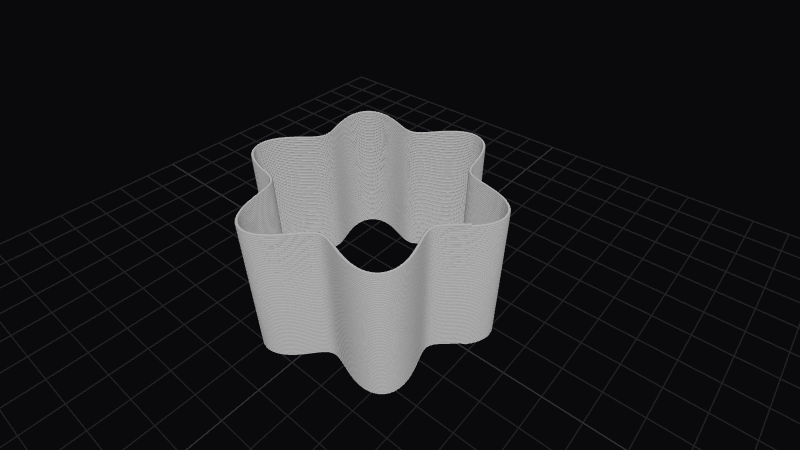
Effect Controls
Interactive preview is available in the interactive reader.
Parameters
Points (N)- Number of ripple lobes around the circumference (1–30). More points yield busier, tighter scallops; fewer create bold, wide lobes.
Depth (mm)- Radial push distance in millimeters (0–10). Controls how far each crest and trough moves from the base circle.
Phase- Angular offset of the ripple pattern in radians (0–6.28). Rotates where peaks sit without changing count or depth.
Spiral (°)- Progressive rotation of the ripple as height increases (−1800–1800°). Use for twisted flutes or helical scalloping.
Alternate layers- Boolean: when enabled, flips the sign of the radial ripple on successive vertical layers so crossings read as alternating over/under weave (basket-weave look). When off, the ripple stays consistent up the part.
How It Works
The effect evaluates a periodic function of the azimuthal angle around each layer. That value scales the surface position along the inward/outward normal of the wall, so the toolpath radius changes while layer height stays tied to the slicer stack. Phase and spiral shift that pattern in angle and height respectively.
Alternate layers inverts the displacement direction between bands or layers so adjacent “strands” appear to pass over and under one another, which reads as woven texture on closed forms.