Hexagon Texture
Nature's favorite shape, now on your print. Hexagon Texture generates a honeycomb grid of flat-top hexagons, each filled with a unique gradient. The borders and gradients create a stained-glass or reptilian-scale look that tiles seamlessly. Perfect for sci-fi armor plating, organic scale textures, or that beehive vase you've been thinking about.
Preview
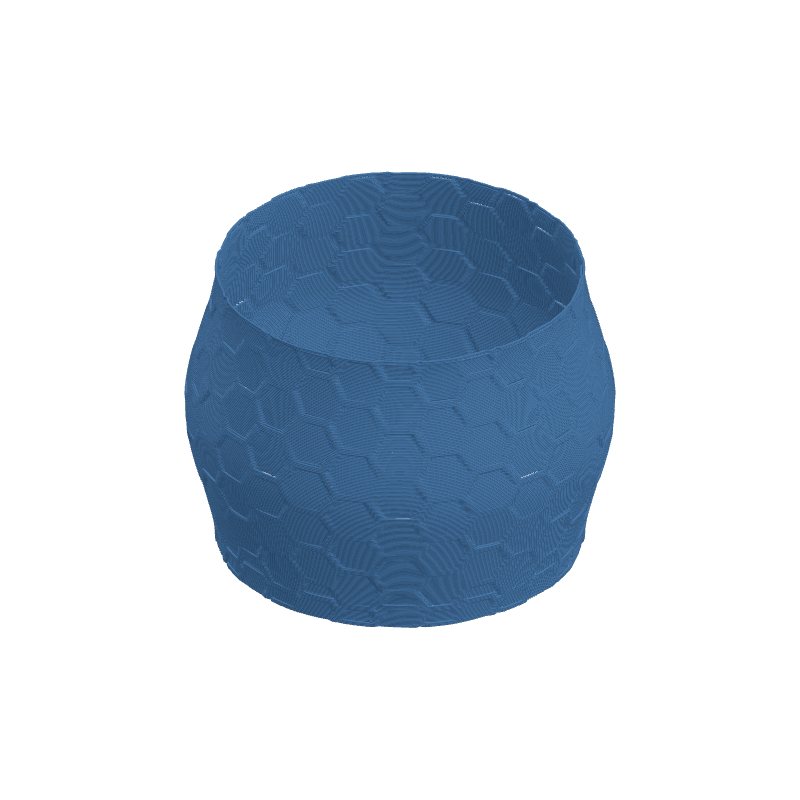
Effect Controls
Interactive preview is available in the interactive reader.
Parameters
Hex Size- Scale of each hexagon. Larger values mean fewer, more prominent hexagons; smaller = dense honeycomb.
Line Width- Thickness of the hexagon borders. Thin lines create delicate cell walls; thick borders add structural presence.
Line Color- Brightness of the border lines. Lets you make borders lighter or darker than the hex faces.
Gradient Dark- Darkest shade in the per-hex gradient fill. Controls the valley depth of each cell.
Gradient Light- Brightest shade in the per-hex gradient fill. Controls the peak height of each cell.
Seed- Randomizes the gradient direction inside each hex cell. New seed = new lighting angle per cell.
Resolution- Texture resolution in pixels. Higher res preserves the crisp hex edges.
Ratio- Texture aspect ratio. Adjust to keep hexagons properly proportioned on your mesh.
Depth (mm)- Displacement depth. Positive makes hexes bulge outward; negative carves honeycomb pockets.
Tile U / Tile V- Repeats the hex grid around (U) and along height (V). Seamless tiling is built in.
Rotation- Rotates the hex grid. 30° switches between flat-top and pointy-top orientation.
Width Gain- Varies extrusion width based on gradient brightness -- brighter hex faces get thicker lines.
Flow Gain- Adds material flow on brighter hex regions for a more pronounced 3D cell effect.