Contour Wave (Woven Lattice)
Shape ModeContour Wave is a shape mode that creates a woven lattice by making each perimeter “wave” up and down in Z as it travels around the object. Adjacent layers are phase-shifted by 180°, so peaks become valleys and the layers interlock—like fabric, basket weave, or chain-link.
When to Use It
- You want a strong tactile surface without relying on heavy outward displacement
- You want a structural pattern that reads clearly even at small diameters
- You want a distinctive “woven” look that’s different from standard vase spirals
How It Works
Unlike standard vase mode (a continuous Z spiral), Contour Wave generates discrete layers where Z oscillates within the layer:
- Layer N: Z undulates with sine wave (peaks at 0°, 90°, 180°, ...)
- Layer N+1: Same wave but phase-shifted by π (peaks become valleys)
- Result: Layers interlock, creating structural weaving
Parameters
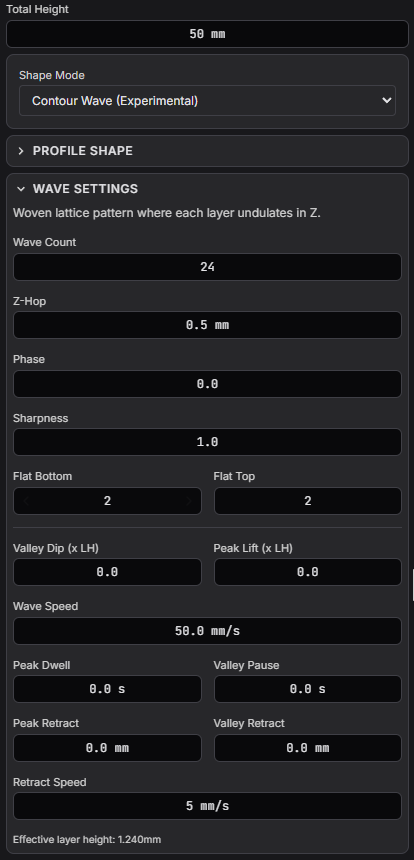
Waves (N)- Number of complete sine wave cycles around the perimeter. Range: 1-100. Higher values create finer lattice patterns.
Z-Hop (mm)- Amplitude of the Z undulation — how far up and down each wave goes. Range: 0-10mm. This also determines the effective layer height (layerHeight + 2×Z-Hop).
Phase- Global angular phase offset for the wave pattern. Use to rotate where peaks/valleys appear. Range: 0-2π.
Sharpness- Controls wave shape. 1.0 = smooth sine wave, >1 = sharper peaks/valleys. Range: 0.1-5.
Flat Bottom- Number of flat (non-woven) layers at the bottom for bed adhesion. Range: 0-20.
Flat Top- Number of flat layers at the top for a clean finish. These sit on top of the wave peaks. Range: 0-20.
Peak Dwell (s)- Pause time at each wave peak (G4 dwell command). Allows filament to cool and solidify before descending. Range: 0-5s. Recommended: 0.3-0.5s for best results.
Valley Pause (s)- Pause time at wave valleys. Range: 0-10s.
Valley Dip (× Layer Height)- How much the nozzle dips below nominal Z at valleys. Helps with layer adhesion. Range: 0-5.
Peak Lift (× Layer Height)- Extra lift above nominal Z at peaks. Helps prevent collisions. Range: 0-5.
Wave Speed (mm/s)- Travel speed during Z oscillations. Slower speeds improve quality. Range: 0.5-200 mm/s.
Peak Retract (mm)- Filament retraction distance at wave peaks. Reduces stringing.
Valley Retract (mm)- Filament retraction distance at wave valleys.
Retract Speed (mm/s)- Speed of filament retraction moves.
Recommended Starting Values
- Waves (N): 8–16 for a clear lattice on typical vase diameters
- Z-Hop (mm): 0.4–0.8mm to start (increase once your printer is stable)
- Sharpness: 1.0 for smooth; 1.2–1.5 for a more “knitted” look
- Peak Dwell (s): 0.3–0.5s when detail is drooping or smearing
- Wave Speed: Start around 10-20 mm/s for best quality
First-time guide dialog
The first time you enable Contour Wave in a project, 3dSynth shows a short onboarding guide with the essentials: what Z-Hop means, why Peak Dwell matters, and the recommended starting values above. Dismiss with Got it, optionally ticking Don't show again to permanently hide it.
Re-opening the guide
If you ticked "Don't show again" and want to see the guide later (e.g. to share it with someone new to Contour Wave), clear the dismissal flag:
- Browser — open DevTools → Application → Local Storage → remove the key
3dsynth_hide_contourwave_guide. Reload the page, then toggle Contour Wave off and on. - Desktop app — the guide state lives in the same localStorage-equivalent store; clearing via DevTools in the app window works the same way.
- Switch projects — a newly opened project re-reads the flag, so the guide won't appear for projects you've already dismissed it in. The flag is per-installation, not per-project.